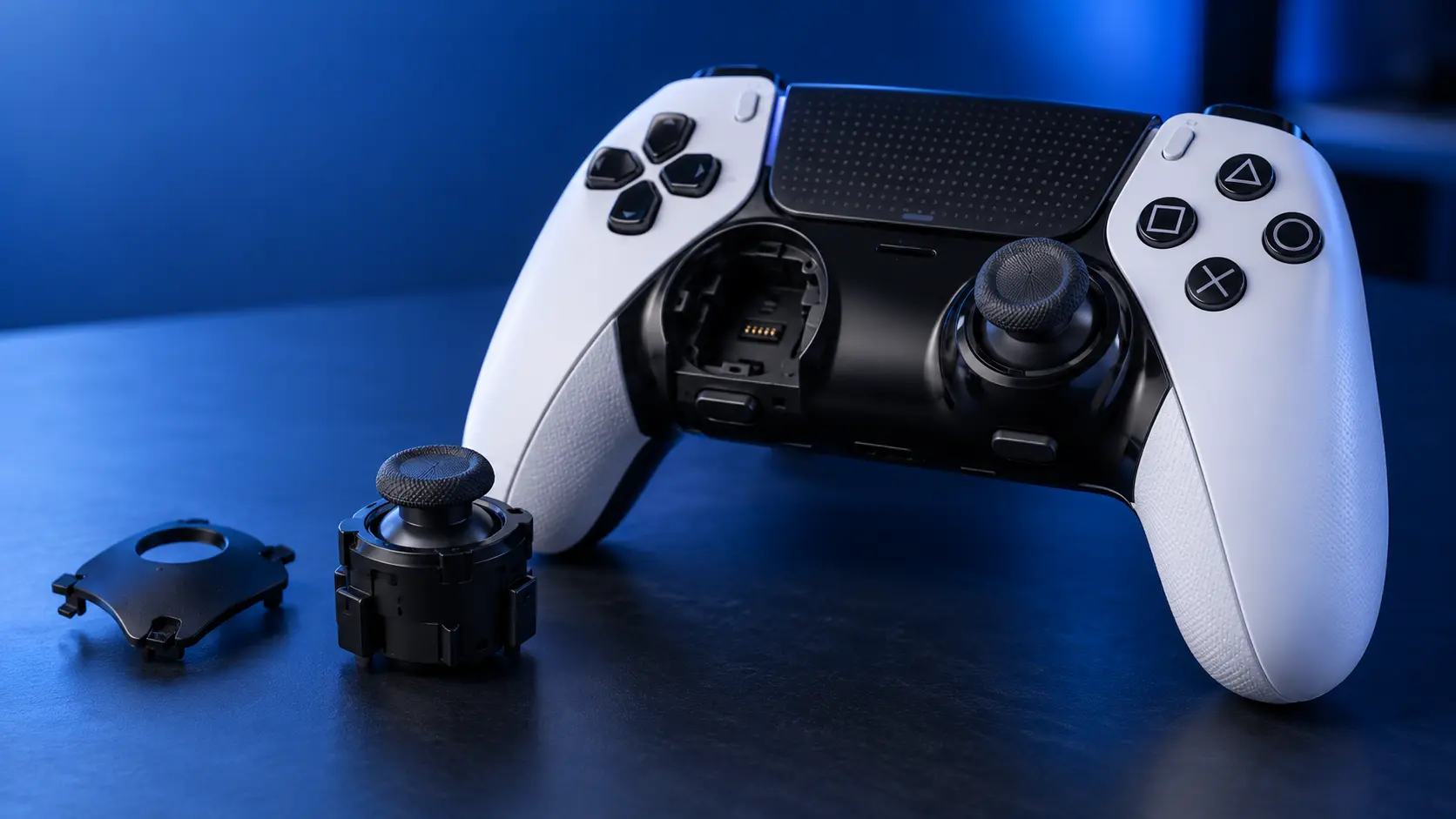
The DualSense Edge is the one controller where my honest advice often isn't "send it to me".
Sony designed the Edge with replaceable stick modules. They lift out without soldering, and Sony sells replacements. If your Edge is drifting, the first thing to try is a module swap you can do yourself in about two minutes.
That's unusual and it's worth knowing about, because an Edge costs roughly three times a standard DualSense and people assume a drifting one is an expensive problem.
Why the Edge is different
On a standard DualSense the stick modules are soldered to the mainboard. Twelve joints each, through a four-layer board, under the battery and shield. Replacing one is proper bench work — that's why it costs £19 rather than the £3 the part is worth.
The Edge has the modules on connectors instead. Pull the side panel off, release the module, lift it out, drop the new one in. No iron, no board work, no risk of lifting a pad.
Sony did this deliberately, because they knew the sticks were the thing that would fail on a controller aimed at people who play a lot.
So should you just swap the module?
If the Edge is drifting and nothing else is wrong with it, yes. Buy the replacement module, swap it, and you're done for far less than a repair would cost.
I'd rather tell you that than take £19 off you for something you can do at the kitchen table.
When swapping doesn't solve it
Three situations where it won't.
The replacements drift too. Sony's replacement modules use the same potentiometer design as the originals. They're new, so they'll last a while, but they wear the same way and eventually do the same thing. If you're on your second or third module, you're not fixing the problem, you're renting a delay.
The fault isn't the module. If a fresh module drifts straight out of the box, the problem is further back — the connector, the board, or the calibration. That's bench work and swapping parts won't touch it.
Something else is wrong. Triggers, buttons, the battery, the USB-C port, a cracked shell. Edge or not, those are all soldered, and they're all things I fix.
The Hall effect option
If you're tired of replacing modules, the same principle applies as on a standard DualSense: the problem is that potentiometer sticks physically wear, and the answer is sticks that don't.
Hall effect modules use a magnet and a sensor with no contact between them, so there's no contact track to wear down. On an Edge that's a bench job rather than a swap, because it means fitting something Sony didn't design the connector around.
If that's what you want for an Edge, get in touch before you book anything and tell me which controller you've got — I'll tell you honestly whether it's worth doing on yours rather than selling you a repair that isn't right for it.
There's background on how Hall effect and TMR differ in Hall effect vs standard sticks.
First, check it's actually the sticks
Before buying anything, confirm what's wrong. The testing in how to test for drift works the same on an Edge, and knowing which stick and which axis tells you which module to order.
And if you've already opened yours and something has gone wrong — a bent connector, a broken clip, a module that won't seat — that's fixable. Send it in rather than writing off a £200 controller.


