Every guide you've found is about three flashing lights. You've got one. So either your fault is different, or you've counted wrong — and it's worth knowing that the second of those is far more common than anyone admits.
The indicator lights on a Supersonic are small, close together, and flash quickly. Glancing at them while you're holding the thing at arm's length in a bathroom is not a reliable way to count anything. A machine described as one light can turn out to be three, and the other way round.
So before anything else, let's make sure you know what you're actually looking at.
Count it properly — use your phone
This is the single most useful thing on this page and almost nobody does it.
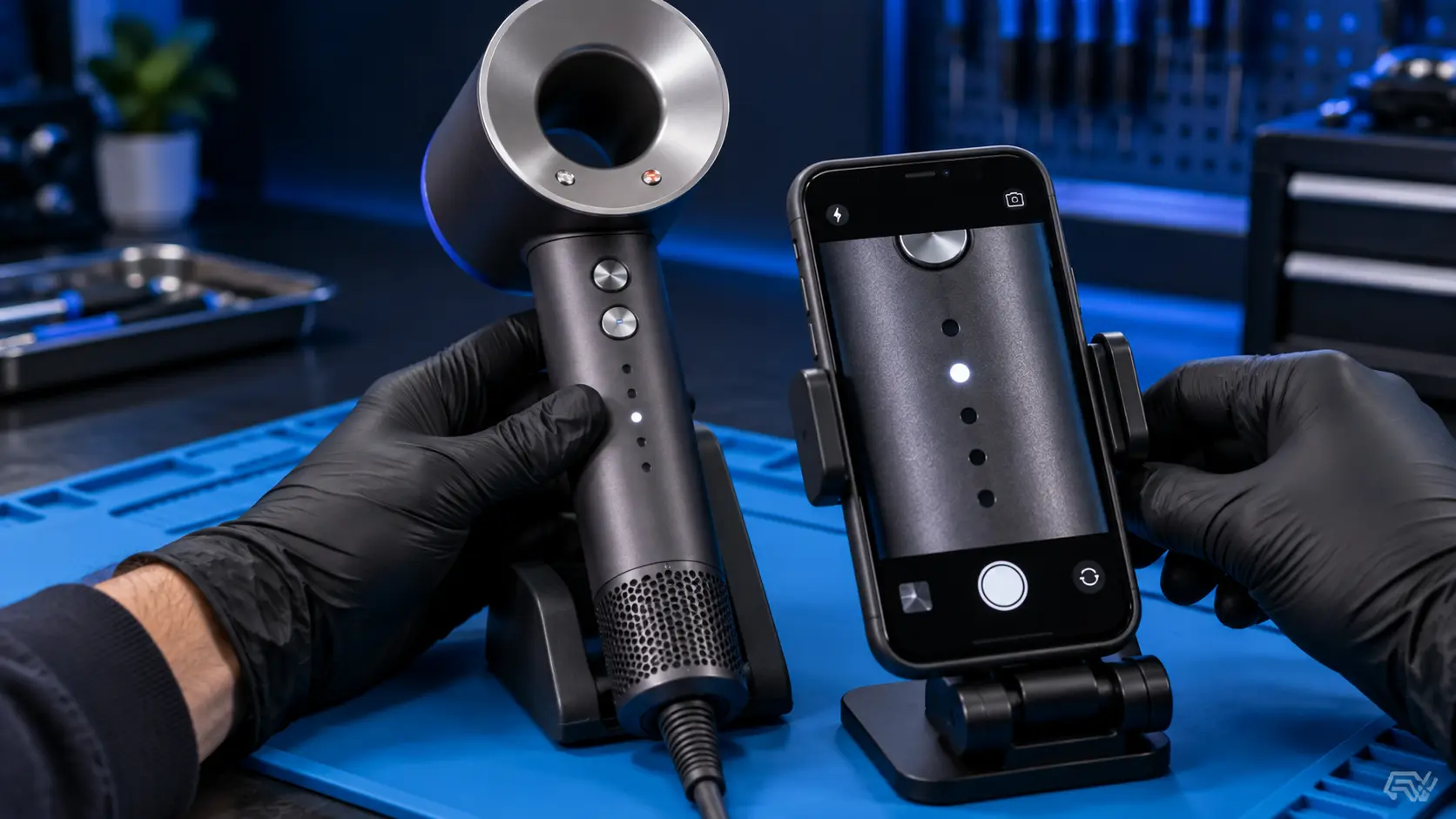
Film the lights in slow motion. Every modern phone can do it — it's usually a mode next to video, and it records at four or eight times normal speed. Switch the dryer on, film the lights for a few seconds, then play it back.
What was an ambiguous flicker becomes something you can count frame by frame. You'll see exactly how many lights there are, what colour they are, and whether they're flashing together or in sequence.
It takes thirty seconds and it turns a guess into a fact. If you're sending the machine to me, that clip is also genuinely useful — send it with the booking and it saves me reproducing a fault that might be intermittent.
What to write down
Four things, and all of them matter:
How many. One, two, three, or all of them.
What colour. Red, white, blue — the colour carries as much information as the count, and people routinely report the number and forget the colour.
Flashing or solid. A steady light and a flashing light are different signals entirely.
When it happens. At the moment you switch on? After a minute or two of use? Only on the highest setting? A light that appears immediately and a light that appears after the machine has warmed up point in very different directions.
That last one is an important question and one that's easy to overlook.
Why most of these point the same way
Here's the thing that makes this less alarming than it looks.
The Supersonic monitors a small number of conditions — temperature, airflow, motor behaviour — and the overwhelming majority of the warnings it produces come back to the same root cause: the machine can't move enough air.
A blocked filter restricts airflow. Restricted airflow means heat isn't being carried away. Rising temperature is what the machine notices and reports. So whether it ends up showing you one light or three, the thing to check first is identical, and it's free.
Take the filter cage off the base of the handle, hold the mesh up to a light, and see whether light passes through it evenly. If it looks grey or felted, that's very likely your answer. Clean it properly — rinsing and drying, not a wipe — refit the cage until it clicks fully home, and try again.
That resolves a large share of warning-light complaints before anyone spends anything.
If it is actually three
If your slow-motion clip shows three, you're on the wrong page and that's fine — three flashing lights on a Supersonic covers that pattern specifically, including both the red and white variants and what it means when a clean filter doesn't clear it.
Go there instead. It's the more common fault and it has a more specific answer.
If you can't match your pattern to anything
This happens, and it's worth being straight about why.
Dyson's published guidance on indicator behaviour is thin, the patterns aren't identical across every model and generation, and a lot of what you'll find online is written by people who have never had one of these apart. If you've searched your exact pattern and found contradictory answers, that's the reason.
But here's the part that matters: the light is a symptom, not a diagnosis. It narrows things down. It isn't what tells me what's wrong.
When one of these lands on my bench I don't need the code to find the fault, because I can measure the things the light is reporting on — airflow, outlet temperature, motor speed and current draw — and compare them against a machine that's working properly. The light says "something is outside range". The measurements say which thing, and by how much.
So if you can't identify your pattern, you haven't hit a dead end. You've just hit the limit of what can be worked out from the outside.
There's a fuller rundown of the patterns and what each indicates in what the lights on a Supersonic mean, which is the page to bookmark if you'd rather understand the machine than just clear this one fault.
Newer models behave differently
If yours is one of the more recent models, the indicator behaviour isn't the same as the original Supersonic, and guidance written for the older machines can send you the wrong way.
If you're not certain which model you have, it's on the rating label and it starts with HD. It's worth knowing before you follow any advice about lights, including mine.
What I do with one
The filter and airway first, because that's where most of them are and there's no sense doing anything clever before the obvious.
Then measurements rather than guesses: airflow and outlet temperature on every setting against a known-good reference unit, motor speed and startup current draw, and the temperature sensors tested for sane values rather than assumed good. A sensor that has failed will often produce a warning with no actual fault behind it — the machine is reporting honestly on information that's wrong.
Back together, run repeatedly through every setting to catch anything intermittent, and PAT safety tested before it's packed.
Common questions
Does one light mean it's less serious than three?
Not necessarily, and I wouldn't read it that way. Fewer lights isn't a smaller problem — it's a different message. What matters more is whether it appears immediately or after use.
It flashes then goes out and the dryer works fine. Is that a fault?
Often it's the machine telling you it protected itself briefly and recovered — usually a short thermal event. It's not nothing. It generally means something is beginning to restrict, and it's a good moment to clean the filter rather than wait for it to become permanent.
Can I clear the code myself?
There's no reset procedure that makes a genuine fault go away, and anything claiming otherwise is best ignored. Fix the cause and the warning stops. Unplugging it for a while will clear a transient thermal warning, but only because the machine has cooled down, not because anything has been reset.
Should I send you the video?
Yes, please — include it with the fault description when you book. Intermittent faults are the hardest to reproduce on the bench, and a clip of yours doing it can save a lot of time.
How long does it take?
The current turnaround is shown when you book. If a part needs ordering, I'll tell you as soon as I've diagnosed it and give you a realistic date.
Film it in slow motion, count it properly, note the colour and whether it appears at switch-on or after use — then clean the filter, because that's where most warning lights lead and it costs you nothing. A good number of these never need to go anywhere.
If the light's still there with a genuinely clean filter, send it to me and I'll measure what it's complaining about. It starts with a £4.99 assessment. I quote before doing any work, and if you go ahead the £4.99 comes off the repair, which includes a 12-month warranty, a PAT safety test and return postage. If you decide not to, or I can't fix it, I post it back and the £4.99 covers that postage. Every repair is done by me personally, on my own bench, start to finish. And don't worry if you never manage to match your pattern to a list online — I don't diagnose these from the light either.
The Repair Works is an independent UK repair service, run by me, Paul — 25 years of hands-on repair experience, working by post for customers across the whole country. Not affiliated with or endorsed by Dyson.